
R6 Cheat Guide
Chapter 2 of 3 · Setup
Guide · 5 steps
Setup
Download the loader, configure Discord overlay, and follow the startup sequence. Complete all steps in order before launching Siege.
Log In to the Loader
Sign in with the username and password you set when redeeming your key.
Open the loader app and sign in. Use the same credentials you created during key redemption — not your Discord or store account.
- 1
Launch the Loader App from your desktop or downloads folder.
Run it as Administrator if your loader requires it.
- 2
Enter your Username and Password.
These were set during key redemption — not your Discord or store account.
- 3
Click Sign In and wait for the dashboard to load.
Lost your credentials?. Open a support ticket on Discord — your key stays linked to your account.
Open a Ticket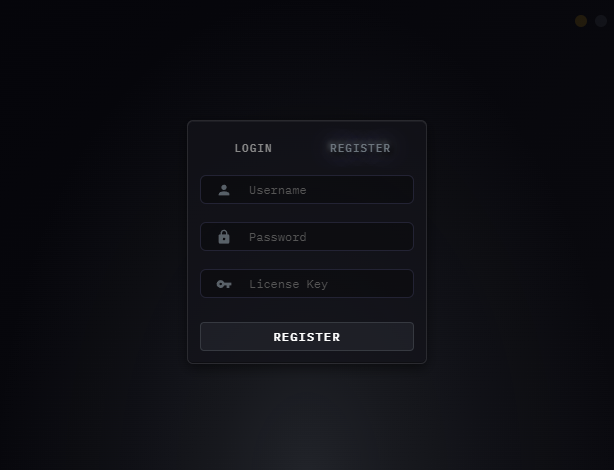
Click image to expand
Configure Discord Overlay
R6 runs on the legacy overlay — the opposite of our other cheats.
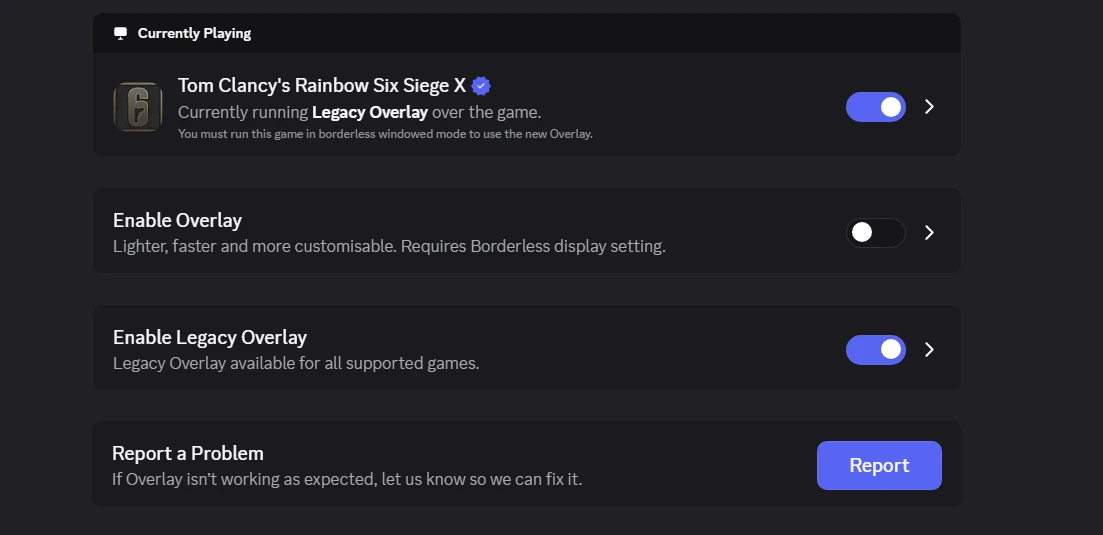
The R6 cheat renders through Discord's legacy overlay. This is the one setting that differs from every other product — the standard overlay must be off and the legacy overlay on, or the menu will never appear in game.
- 1
Open Discord → User Settings → Game Overlay.
- 2
Disable Enable Overlay — the new standard overlay.
This is the toggle labelled "Lighter, faster and more customisable."
- 3
Enable Enable Legacy Overlay.
Labelled "Legacy Overlay available for all supported games."
- 4
Enable the toggle for Tom Clancy's Rainbow Six Siege X under Currently Playing.
- 5
Go to User Settings → Advanced and enable Hardware Acceleration.
- 6
Read the status line under the game name — it must say "Currently running Legacy Overlay".
This is the line that tells you whether you can inject straight away.
Says "Currently running Legacy Overlay". You're good to inject — skip the first-time call procedure below and carry on to the next step.
Click image to expand
Status says "Initializing" instead? Do this once
First time onlyIf the status line shows Initializing — or anything other than Currently running Legacy Overlay — the overlay has to be woken up once through a Discord call. Do this before you launch Siege, and only the first time you inject.
- 1
Join a Discord call with a friend or an alt account, and screenshare in full screen.
- 2
Open the loader, load the cheat, and press OK.
- 3
Launch Rainbow Six Siege.
You may get an overlay error on launch. That is expected — only ignore it if Legacy Overlay is already enabled.
- 4
From the lobby, keep loading the cheat and press INSERT — the menu should appear.
Still nothing? Close Siege and repeat from step 1, or restart your PC and run the whole process again from the top.
Discord Restart — Normal Behavior
Discord may restart on first load. This is expected and only happens once.
On the first time you load the cheat, or after a Discord update, Discord may automatically restart. This is part of the overlay initialisation process and does not indicate a problem.
- 1
Click Load in the loader.
- 2
If Discord restarts, allow it to complete — do not force-close it.
- 3
After Discord reopens, re-open the loader and click Load again.
Only happens once. After the first successful load, Discord will not restart again unless Discord itself receives an update.
Wait for Successful Load
Wait for the loader to confirm injection, then launch Siege and open the cheat menu.
After clicking Load, the loader will display a confirmation message. Do not open Siege until you see this — it means the cheat has injected successfully.
- 1
Click Load in the loader and wait.
- 2
Wait until the loader shows "Successfully loaded, please launch game".
Do not open Siege before this message appears.
- 3
Launch Rainbow Six Siege.
- 4
Once in the lobby, press INSERT to open the cheat menu.
Cheat menu not appearing?. Go back to step 2 and confirm the legacy overlay is on, the standard overlay is off, and Hardware Acceleration is enabled in Discord → User Settings → Advanced. If the overlay status still reads "Initializing", run the first-time call procedure in that step.
Startup Sequence
Follow this exact order every session to ensure the cheat injects correctly.
Every session, follow this sequence in order. The cheat must be injected before Siege launches — opening the game first will result in the cheat not loading or a detection.
- 1
Open the Loader and log in.
- 2
Click Load — the loader will close automatically once injection is complete.
- 3
Open Siege and play.
Never open Siege before clicking Load. The cheat injects into the game process at launch. Opening Siege first means the injection window is missed.
Finish all 5 steps to complete setup
Mark each step done as you go. The summary unlocks when all steps are finished.
Leave a Review & Get Rewarded
Enjoying the product? Leave us a 5-star Trustpilot review and claim a free reward as a thank you.
After leaving your review, open a support ticket on Discord and send a screenshot. Choose one of the two rewards below: