
Redeeming your key
Follow these steps in order to activate your key and start using your product.
Haven't received your key?
Check your email inbox and spam folder. You'll need it to register your account in the loader.
Step 1 of 5 — Locate Your License Key0%
1
Find the Email from UNBANNED.GG
Check your email inbox for an order confirmation from UNBANNED.GG. If you can't find it, check your Spam / Junk folder.
2
Copy Your License Key & Note Your Invoice ID
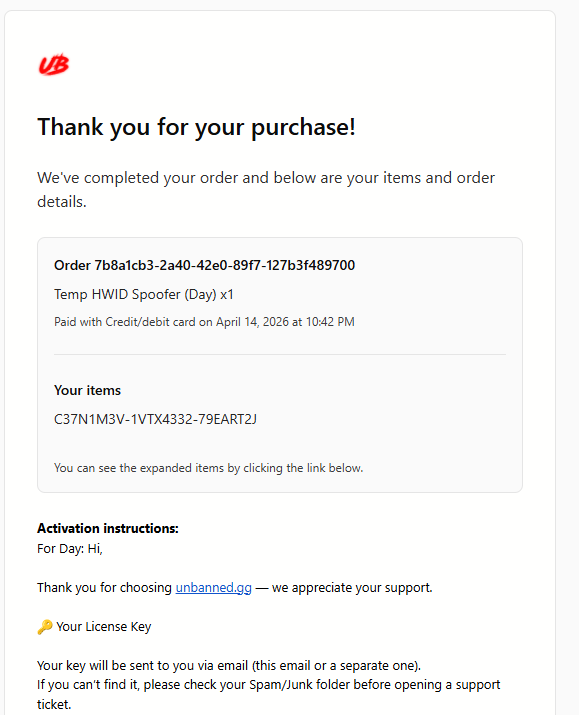
1Note Your Invoice ID
The Order ID at the top of the card (e.g. 7b8a1cb3-2a40-42e0...) is your Invoice ID.
You'll need this to redeem via our Discord bot — keep it handy.
2Copy Your License Key
Your license key is listed under Your items (e.g. C37N1M3V-1VTX4332-79EART2J).
Copy it — you'll need it to create your loader account in the next step.